
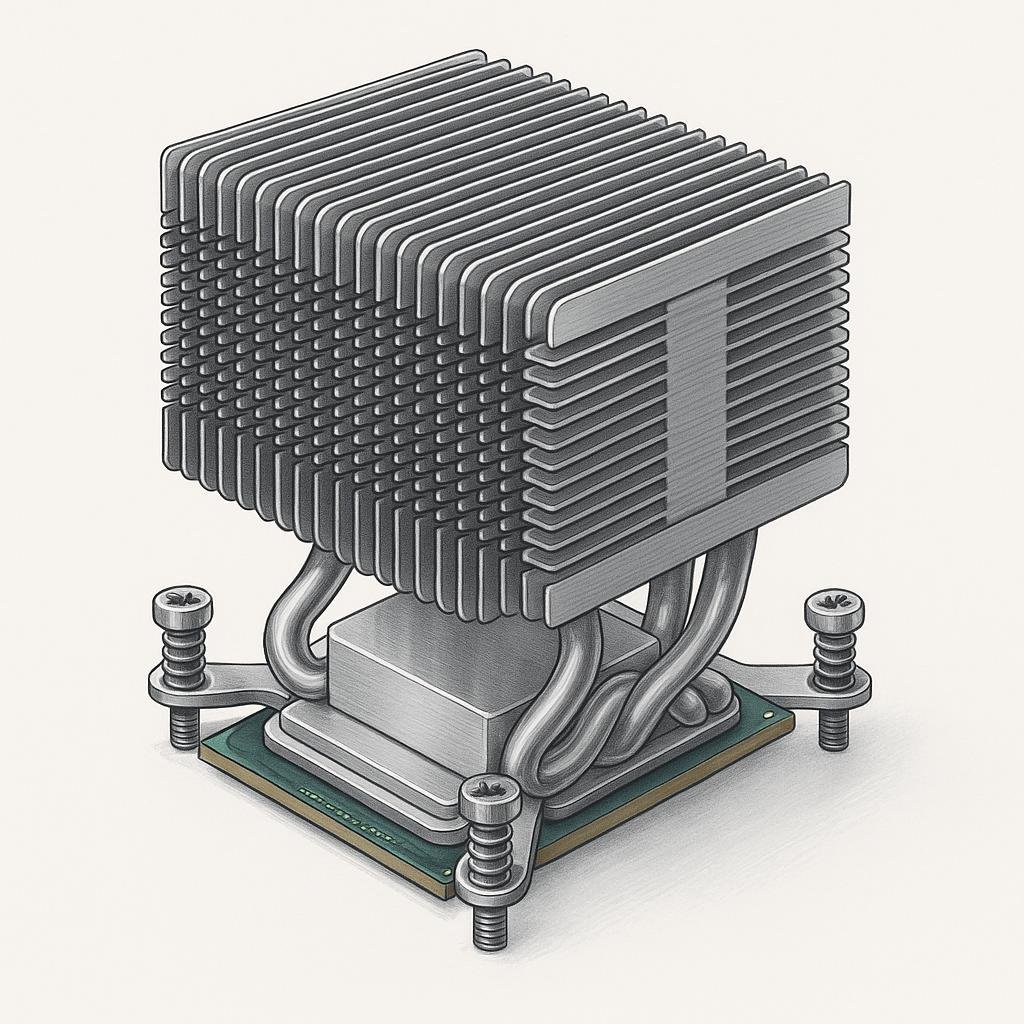
Ever wondered why your computer doesn’t overheat despite running demanding applications for hours? The answer lies in a small but mighty component called a heat sink. This often-overlooked piece of hardware is crucial for maintaining optimal performance and extending the life of your device. Let’s dive into the fascinating world of heat sinks and explore why they are indispensable in modern technology.
What Is a Heat Sink?
A heat sink is a passive heat exchanger that cools a device by dissipating heat into the surrounding environment. In simple terms, it’s a component designed to lower the temperature of an electronic device. Heat sinks are commonly made from metals like aluminum or copper because of their excellent thermal conductivity. You’ll typically find these heat-dissipating marvels attached to processors, graphics cards, and other high-performance electronics.
The primary function of a heat sink is to increase the surface area available for heat dissipation. This is achieved through a design that includes fins, which are thin, flat surfaces that protrude from the base of the heat sink. The fins allow for a greater surface area to be in contact with the air, thus improving the efficiency of heat transfer.
How It Works
The operation of a heat sink can be understood through the basic principles of thermodynamics. Here’s a simplified explanation:
- Heat Absorption: The heat sink absorbs heat generated by the electronic component it’s attached to. This is possible due to the heat sink’s thermal conductivity properties.
- Heat Transfer: Once absorbed, the heat is transferred from the base of the heat sink to the fins.
- Heat Dissipation: The fins increase the surface area exposed to the air, facilitating the dissipation of heat through convection. The air moving over the fins carries away the heat, cooling the heat sink and the device.
The efficiency of a heat sink depends on various factors such as material, design, and the airflow around it. Choosing the right heat sink for your device involves balancing these factors to achieve optimal thermal management.
Step-by-Step Guide to Choosing a Heat Sink
Selecting the appropriate heat sink for your needs can significantly impact the performance and longevity of your electronic device. Here’s a step-by-step guide to help you make an informed decision:
- Identify the Component: Determine which component in your device requires cooling. Common candidates include CPUs, GPUs, and power transistors.
- Calculate Thermal Requirements: Find out the thermal design power (TDP) of the component. This value indicates the maximum amount of heat the component can generate under maximum load.
- Choose the Material: Decide between aluminum or copper. Copper offers better thermal conductivity but is heavier and more expensive than aluminum.
- Consider the Size and Design: Ensure the heat sink fits your device. Consider the number of fins and their spacing to maximize airflow and heat dissipation.
- Evaluate Active vs. Passive Cooling: Decide if you need a fan (active cooling) or if passive cooling will suffice. Active cooling is more effective but can be noisier and consume more power.
- Check Compatibility: Ensure the heat sink is compatible with your device’s mounting system.
By following these steps, you can select a heat sink that optimally manages heat for your specific application, enhancing performance and reliability.
Common Mistakes to Avoid
While heat sinks are crucial for preventing overheating, there are common mistakes that can undermine their effectiveness. Here are a few pitfalls to watch out for:
- Improper Installation: Failing to install the heat sink correctly can lead to poor thermal contact, reducing its efficiency.
- Ignoring Airflow: Without adequate airflow, even the best heat sink can’t perform effectively. Ensure your device has proper ventilation.
- Overlooking Maintenance: Dust and debris can accumulate on the fins, impeding heat dissipation. Regular cleaning is essential.
- Using the Wrong Thermal Paste: The thermal paste is crucial for efficient heat transfer between the component and the heat sink. Using the wrong type can negatively impact performance.
By avoiding these mistakes, you can ensure that your heat sink operates at peak efficiency, safeguarding your device against overheating.
Real-World Examples
Heat sinks are ubiquitous in the world of technology, and their applications extend beyond computers. Here are a few real-world examples where heat sinks play a vital role:
- Computers: In desktop and laptop computers, heat sinks are essential for cooling the CPU and GPU, enabling stable performance during intensive tasks like gaming or video editing.
- LED Lighting: High-power LED lights generate significant heat. Heat sinks prevent overheating, thereby extending the lifespan of the LEDs.
- Power Supplies: Heat sinks are used in power supply units to dissipate the heat generated by electrical components, ensuring reliable operation.
- Automotive Electronics: In cars, heat sinks are used in components like the engine control unit (ECU) to manage heat and maintain performance under varying conditions.
These examples highlight the versatility of heat sinks and their critical role in diverse applications, from enhancing computing power to improving energy efficiency in lighting.
Final Thoughts
Understanding the function and importance of heat sinks is essential for anyone interested in technology and performance optimization. These small, unassuming components are pivotal in keeping our devices running smoothly and efficiently. Whether you’re a tech enthusiast building your own PC or an engineer designing electronic circuits, the knowledge of heat sinks can empower you to make better choices regarding cooling solutions.
By selecting the right heat sink and maintaining it properly, you can ensure your devices operate at their best, offering you reliable performance and extended lifespans. So next time you fire up your computer or turn on those LED lights, take a moment to appreciate the humble heat sink working tirelessly behind the scenes to keep everything cool and running smoothly.